How AI Detects Safety Hazards from Job Site Photos
Key Takeaway
AI image hazard recognition helps safety teams spot visible risks faster and with greater consistency. It turns job site photos into actionable insights by linking hazards to corrective actions. Human review ensures each finding is accurate and properly addressed. The result is fewer missed hazards and stronger safety performance across every site.
What Is AI Image Hazard Recognition in EHS?
AI image hazard recognition uses computer vision, a type of AI that can interpret images, to review job site photos and identify visible safety risks. It scans for patterns a trained worker would notice, but it does it the same way every time, without rushing or skipping over details.
Instead of depending on what someone happens to catch in the moment, the system applies a consistent review to every image and flags what stands out. That makes it easier to catch the kinds of issues that often get overlooked during routine work.
It focuses on practical, visible conditions that show up every day, such as:
A worker grinding or cutting without proper eye or face protection
Equipment, pallets, or stored materials narrowing or blocking an exit path
Liquid on the floor or debris left in a walking path
Access points that require stepping over, around, or through unsafe obstacles
Over time, this creates a more dependable way to identify risk. Instead of isolated observations, teams start to see where issues repeat, which areas need attention, and how conditions change across shifts.
Catching these problems earlier gives teams more time to act, which helps prevent the types of incidents that often start with small, visible hazards. The next step is understanding how those insights actually move through a system and turn into action.
How Does AI Image Hazard Recognition Work in an EHS System?
A single photo from the field doesn’t solve anything on its own. What matters is how that image moves through the system and turns into action. From the moment a photo is captured, each step builds on the last.
Step 1: Capture and Upload a Job Site Image
The process starts in the field. A supervisor or worker takes a photo during a routine inspection and uploads it directly into the EHS system using a mobile device.
This step fits naturally into existing safety practices. OSHA expects employers to run ongoing inspections as part of a proactive safety program, and photo capture adds a simple way to document what conditions actually look like in the moment.
Step 2: The AI Scans the Image for Hazards
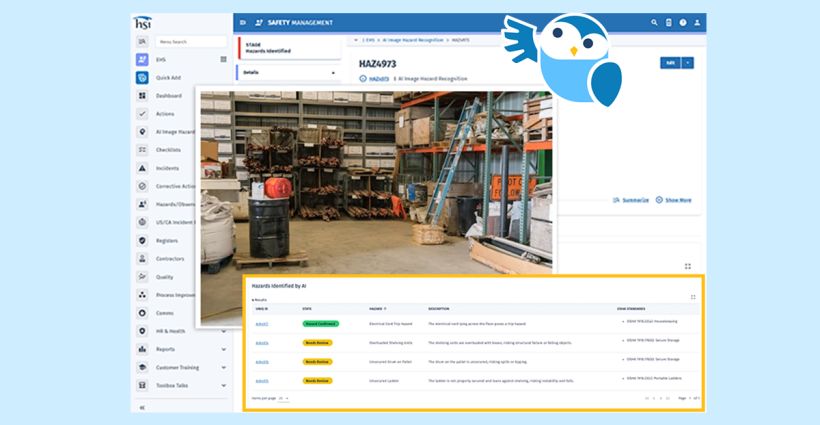
Once the image is uploaded, the system analyzes it and looks for visible conditions that signal risk. It focuses on patterns that are recognizable but often missed when work is moving quickly.
For example, the system may flag:
A worker on a ladder without proper fall protection in place
Extension cords running across a walkway, creating a trip hazard
Boxes or materials stacked too close to electrical panels
A fire extinguisher that is blocked or not easily accessible
These are common conditions tied to clear requirements. For example, OSHA states that exit routes must remain free and unobstructed under 29 CFR 1910.37, which makes them a strong fit for image-based detection.

Step 3: A Human Validates the Finding
After the system flags a potential hazard, a supervisor reviews the image to confirm what is actually happening. This step adds the context that a single image cannot provide, such as the task being performed or the level of exposure.
The reviewer answers a few key questions:
- Is the hazard real?
What is the work activity?
What control is appropriate?
This keeps decision-making grounded in real conditions and aligns with guidance like the NIST AI Risk Management Framework, which emphasizes oversight throughout AI use.
Step 4: The System Triggers a Corrective Action
Once the hazard is confirmed, the system turns that finding into a tracked action. Instead of relying on memory or informal follow-up, the issue moves into a structured workflow.
The system assigns an owner, sets a due date, and defines the corrective task. This supports OSHA’s approach to hazard control, which includes implementing fixes and verifying they are effective. For example, a blocked exit can be flagged, assigned, and cleared within the same shift.
Step 5: Apply the Right Control
At this point, the focus shifts from identifying the issue to resolving it correctly. A strong process looks beyond quick fixes and considers what will prevent the hazard from returning.
If the issue involves PPE, the response should still account for the broader risk. The NIOSH Hierarchy of Controls ranks PPE as the last line of defense, which reinforces the need to look at task setup, environment, and process, not just equipment.
Step 6: Verify and Close the Loop
After the corrective action is complete, the team documents the fix with a follow-up image. This step confirms that the hazard is not only addressed, but actually resolved.
The system records before and after images, tracks how long it took to fix the issue, and logs who completed the work. This creates a clear record and supports OSHA’s expectation to follow up and confirm that controls are effective.
Step 7: Reinforce Training and Behavior
When the same type of hazard appears more than once, it signals a deeper issue. Instead of treating each case in isolation, the system can connect these patterns to training or coaching.
This supports OSHA requirements for worker understanding and safe work practices. For example, 29 CFR 1910.132 requires employees to demonstrate proper PPE use, and 29 CFR 1926.21 requires training on recognizing and avoiding unsafe conditions. Over time, this link between observation and learning helps reduce repeat issues.
When each step connects clearly from capture to follow-through, teams can act faster and more consistently, which is where the right system makes a measurable difference.
How Does HSI Help Turn Hazard Detection Into Real Safety Outcomes?
Most safety teams don’t struggle to capture hazards. They struggle to act on them quickly and consistently across every site.
That is where HSI makes the difference.
HSI brings AI image hazard recognition into a connected EHS system, so every photo leads to clear action, accountability, and follow-through. Instead of relying on scattered tools or manual processes, your team gets one platform that turns observations into prevention.
With HSI and the Sky AI assistant, you can:
Turn job site photos into real-time hazard insights
Detect risks like missing PPE, blocked exits, and poor housekeeping
Assign corrective actions with clear ownership and deadlines
Track progress and verify fixes with full visibility
Connect repeat issues to targeted training and coaching
If your current process relies on manual reviews, emails, or disconnected systems, you are likely leaving gaps in your safety program.
See how HSI can help you catch more hazards, act faster, and build a more consistent safety program. Get a demo today.
FAQ
What is AI image hazard recognition in workplace safety?
AI image hazard recognition uses computer vision to analyze job site photos and identify visible risks like missing PPE, blocked exits, or spills. It helps safety teams detect hazards more consistently and take action faster.
How does AI improve hazard identification compared to manual inspections?
AI reviews every image using the same criteria, which reduces human error and missed hazards. While inspections can vary by person or time, AI adds a consistent layer of review that helps standardize safety practices across sites.
Can AI image recognition replace safety inspections or competent persons?
No, AI does not replace inspections or competent persons. It supports the process by flagging visible hazards, but a qualified person must review the findings, assess the situation, and decide on the correct controls.
What types of hazards can AI detect from job site images?
AI works best with visible hazards such as missing PPE, obstructed exit routes, poor housekeeping, and unsafe walking or working surfaces. It cannot detect non-visible risks like chemical exposure, noise levels, or air quality.
How do AI-identified hazards turn into corrective actions?
Once AI flags a hazard, the EHS system routes it into a workflow where a supervisor validates the issue, assigns a corrective action, sets a deadline, and tracks completion. This process ensures hazards are not just identified, but resolved and verified.
Related Articles
Enhance Safety with AI: Predict, Prevent, Protect
Reduce Workplace Incidents with AI | HSI
EHS Environmental, Health & Safety

Preventing Utility Incidents with AI-Driven Corrective Actions
How AI Enhances Utility Safety with Corrective Actions
Industrial Skills

AI-Powered EHS Solutions: Affordable Safety for Small Businesses
Affordable AI-Driven Safety Tools for Small Businesses
EHS Environmental, Health & Safety